















Centos7.6如何配置使用supervisor设置进程守护
1.输入该命令按回车键:vi /etc/supervisord.conf

2.按“i”进入插入模式,找到inet_http_server,将注释去掉
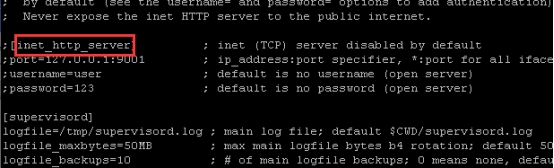
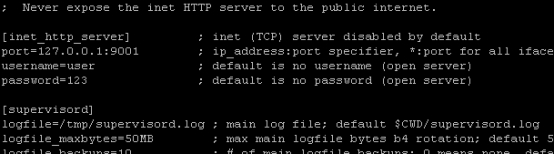
3.找到include,将注释去掉,设置ini文件的保存目录,修改完成后按ESC键输入wq按回车键保存退出vi编辑
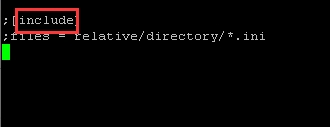
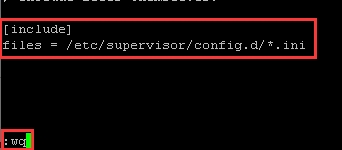
4.输入该命令按回车键:mkdir /etc/supervisor

5.输入该命令按回车键:mkdir /etc/supervisor/config.d

6.输入该命令按回车键:cd /etc/supervisor/config.d

7.输入该命令按回车键:vi test.ini

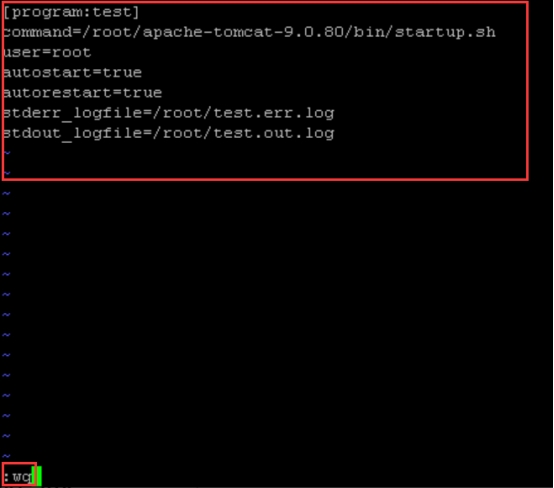
8.按i进入插入模式,参考以下方式设置,command为指定程序路径,修改完成后按ESC键输入wq按回车键保存退出vi编辑
[program:test]
command=/root/apache-tomcat-9.0.80/bin/startup.sh
user=root
autostart=true
autorestart=true
stderr_logfile=/root/test.err.log
stdout_logfile=/root/test.out.log
9.输入该命令按回车键:supervisord -c /etc/supervisord.conf
